
Post them from the kitchen before the doors open. Type them out or snap a photo of the board - they format themselves, land on your site, and come down on their own when they expire.
Whichever one matches how your kitchen already works. Same tool, same minute, either way.
Typed or dictated
Posted Thursday
🍴 Rattle off the list into your phone or type it in. It lands on the site styled to match, prices and all - then hides itself the night it expires. Post Thursday, let them run out Sunday at midnight, and you never have to take them down. Try it yourself ↓
Straight from the board
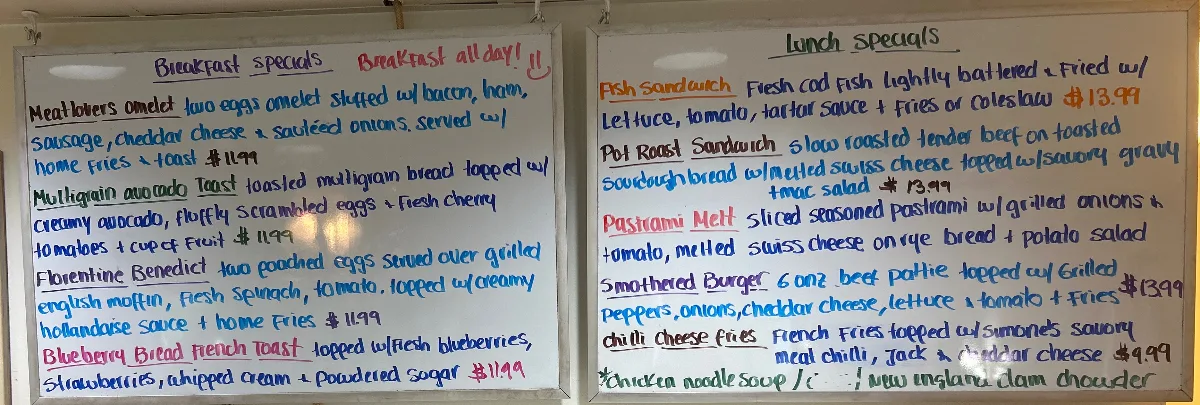
📷 Already write them on a chalkboard? Snap it, confirm, done. Set it to auto-approve and it's about 10 seconds from photo to live.
Three steps, and only the first one is yours.
Tap a hidden button built into your own site, then say the specials out loud, type them, or photograph the board. No app, no password to remember.
Each dish gets its own line, prices stay put, and the whole block picks up your site's fonts and colors. Long lists split into two columns so your homepage doesn't run off the screen.
You set when it expires. Sunday night, end of day, whenever. Nobody has to remember to take it down, so a Tuesday special never sits on your site through Friday.
Those three steps are three boxes on one screen. You get a link in your email, tap it, and you're in - no password to remember. This is what you see - and these three boxes really work, so click around.
Whatever is in this box is exactly what goes on your homepage, in this order. One special per line, written the way you want people to read it - price, times, all of it.
This week's specials
No formatting to fuss with. Prices are whatever you type - 15, $15, market price. We don't touch them.
Type something new up top and it saves itself down here.
Tick something saved down here and it drops into the box up top.
Every special you've ever posted, kept. Nothing new this week? Don't retype a thing - tick the ones you're running and they fill in the box above. Untick one and it comes back out.
Your saved specials
Go ahead - tick one and watch the box above.
The top three are ticked because those three lines are sitting in the box above - that's the only thing a tick means. The salmon burger is the new addition: publish something you've never run before and it saves itself down here, ready to tick next week. Got a dish wrong, or done with one for good? Edit and Delete are right on the row.
Happy with the list? One box left.
Give it a heading, tell it when to clear itself, and send it. Or print it first - you don't have to publish to do that.
Publish to your homepage
3 specials will go on the homepage.
Export PDF opens your browser's print dialog, exactly like it does for the restaurant.
"Clear them after" fills itself in with the coming Sunday, so most weeks you don't touch it. Up to 40 specials at a time, about 200 characters a line - more room than any special we've ever seen.
↓ And here's how it lands on your homepage
Say you run specials Thursday through Sunday. Here's your whole week with it.
Want them gone early? "Clear this week's specials" takes them off the site right now and leaves your saved list untouched. And if the date ever gets typed wrong, the block just doesn't show - your homepage never sits there with an empty box on it.
You typed the list once. It can go three places.
Right where people land, styled to match the rest of your site.
Export PDF turns the same list into a clean printed sheet - your logo up top, dishes down the middle, "Available through Sunday, August 23" at the bottom.
Publish, and the tool offers to email the same specials to your subscriber list.
On sites where we've set up a subscriber list for you.
Same three boxes. Anything you'd write on the board out front.
Clears Saturday morning
Big band Friday? Closing early for a private party? Type it in the first box, change the heading to whatever fits, and set it to clear itself Saturday morning.
Keep each line short - about 200 characters, roughly a long text message. That's the right length for a homepage anyway; nobody stops to read a paragraph. And it gets saved to your list like a dish does, so the next time that band comes back, you tick it and you're done.
Get It On My Site →Social posts disappear in a day. Your website works for you every time somebody searches.
Google reads your website. It does not read your Facebook page the same way.
Every special carries an expiration. When it passes, the block disappears by itself.
From your phone, standing at the pass, before service starts.
That is where your customers are looking, usually from the car.
We set it up around the way your kitchen already writes specials.
Part of the monthly plan on the sites we build and manage.
Specials ride on the same system that handles the rest of your site. New hours, a menu price, a fresh photo - same button, same phone, same minute.
Tell us how your kitchen writes them and we'll set the rest up. It comes built into the websites we design and manage.
Get StartedOr call us directly: 203.530.7396